
A Complete Guide to Using the Bybit Bitcoin Exchange for Beginners

Bybit has become one of the most popular cryptocurrency derivatives exchanges in the world, particularly for trading Bitcoin. If you are new to the platform, understanding how to use the Bybit Bitcoin exchange effectively is essential for both security and profitability. This guide will walk you through the key steps, from account creation to executing your first trade.
1. Creating and Verifying Your Bybit Account
To begin, visit the official Bybit website. Click on the "Sign Up" button. You can register using your email address or phone number. After entering your details, you will receive a verification code. Once verified, it is highly recommended to enable Two-Factor Authentication (2FA) using an app like Google Authenticator. This adds a critical layer of security to your account. While Bybit does not require full KYC (Know Your Customer) for basic withdrawal limits, completing identity verification will increase your daily withdrawal allowance and unlock additional features.
2. Depositing Bitcoin into Your Bybit Wallet
Before trading, you need to fund your account. Navigate to the "Assets" or "Wallet" section and select "Deposit." Choose Bitcoin (BTC) from the list of assets. Bybit will generate a unique deposit address. Copy this address and paste it into the withdrawal field of your external wallet or another exchange. Important: Always double-check the network (e.g., Bitcoin network) to ensure compatibility. After the network confirms the transaction, your Bitcoin will appear in your Bybit Spot Wallet.
3. Transferring Funds to the Derivatives Account
Bybit separates your funds into different accounts: the Spot Wallet and the Derivatives Wallet (for futures and perpetual contracts). To trade Bitcoin futures, you must transfer your BTC from the Spot Wallet to the Derivatives Wallet. Click "Transfer," select the source as "Spot Account" and the destination as "Derivatives Account," enter the amount, and confirm. This step is often overlooked by beginners but is crucial for accessing leveraged trading products.
4. Understanding the Trading Interface
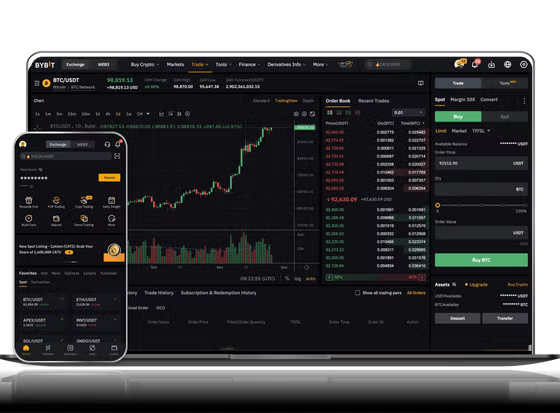
Click on "Derivatives" in the top menu and select "BTCUSDT Perpetual." The interface may look complex at first. On the left, you see the price chart. The middle section contains the order book (showing buy and sell orders). Below this, you will find the trading panel where you can place orders. Key terms include:
- Market Order: Buys or sells instantly at the current market price.
- Limit Order: Buys or sells only at a specific price you set.
- Leverage: The multiplier for your position. Higher leverage increases both potential profit and risk.
5. Placing Your First Bitcoin Trade
Decide whether you want to go "Long" (betting the price will rise) or "Short" (betting the price will fall). Set your leverage (e.g., 5x or 10x for beginners). Enter the amount of Bitcoin you want to trade. For a Market Order, simply click "Buy Long" or "Sell Short." For a Limit Order, enter your target price. Always set a "Stop Loss" and "Take Profit" to manage your risk automatically. Bybit allows you to set these directly in the order confirmation window.
6. Withdrawing Bitcoin from Bybit
When you are finished trading and want to move your Bitcoin out, go back to the "Assets" page. Transfer your funds from the Derivatives Wallet back to the Spot Wallet. Then, click "Withdraw." Enter your external wallet address, the amount, and complete the security verifications. Withdrawal times vary depending on network congestion and fees.
Final Tips for Using Bybit
Always start with a small amount to test the platform. Use the "Testnet" version of Bybit to practice trading without real money. Never share your API keys or password with anyone. Bybit is a powerful tool, but it requires discipline. Remember that leveraged trading can amplify losses just as easily as gains. Keep your trading strategy simple and always prioritize security.


发表评论